Intermediate Modding Tutorial I - Creating Necklaces

Intermediate Modding Tutorial I: Creating Necklaces inside the Modkit
To make a necklace we are going to need to set up an empty project as we would normally do: create project, give it a name and load inside the modkit all our meshes, textures and materials. Please refer to my previous tutorial on how to make an empty project if you don’t know how to do this yet, then come back here for the specific directions on how to put your necklace in game.

(!) I will soon be uploading a video so that you can follow the step by step guide on how to put a necklace in the modkit from scratch.

  1. PROJECT SET UP

After setting up everything this is how your project should look like:
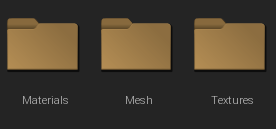
If your pendant has swatches, you should have one mesh per swatch. You don’t need to create more meshes, just load one mesh into the modkit, then copy and paste (Ctrl + C, Ctrl + V) to create as many copies as you want. The modkit will automatically rename your meshes “mesh1”, “mesh2”, etc.

In my case, I have 3 swatches, so this is how my “Mesh” folder looks like:

  1. DATA EDITOR

Once you have everything that you need, please head to the data editor for your project. Here, you will have to choose “Skinned Accesory Mesh” and “Skinned Accesory” as the data assets to work with. See picture bellow for reference.

2.1. “SKINNEDACCESSORYMESH” DATA ASSET

Double click on “SkinnedAccesoryMesh”.

On the list that will unfold, search for anything that is W_Necklace or M_Necklace, like the ones you see in the picture bellow, and choose whatever you need based on the target gender.

W_Necklace will create a necklace for women, while M_Necklace will create one for men.

Once you have chosen, right click and select “append new item”. The menu bellow will appear. Follow the steps in the images to set everything as it should be:
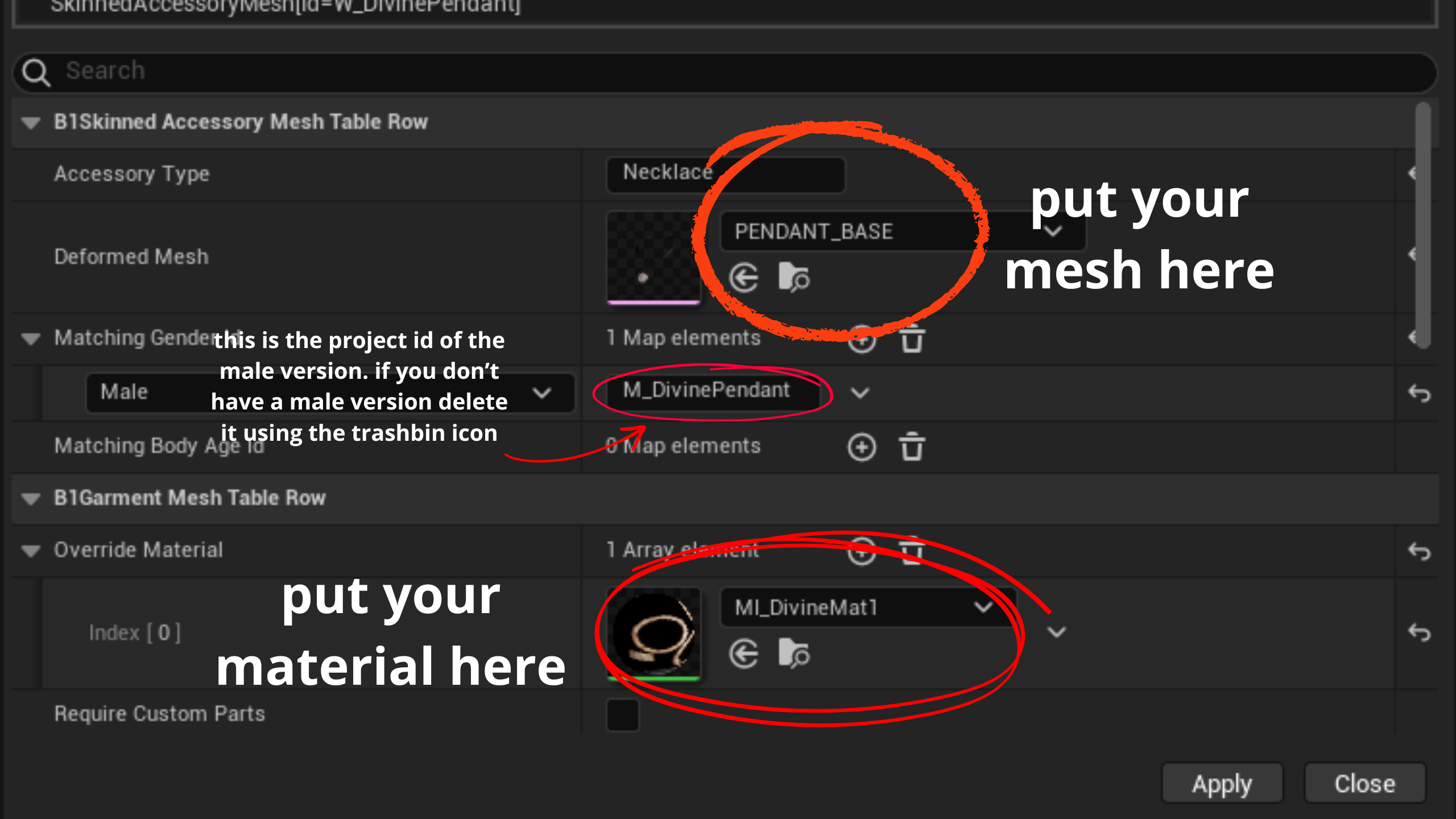
For the next step, it is VERY IMPORTANT that you set your “Skinning target” to “HEAD”. This means the cc piece you are putting into the game will be taking its weight information from the neck and head, instead of the body.

There are no body regions for the neck, so I didn’t include any. Necklaces typically don’t cover much so it’s best this way.

2.2. “SKINNEDACCESORY” DATA ASSET

Double click on “SkinnedAccesory”.

On the list that will unfold, search for anything that is W_Necklace or M_Necklace, like the ones you see in the picture bellow, and choose whatever you need based on the target gender.

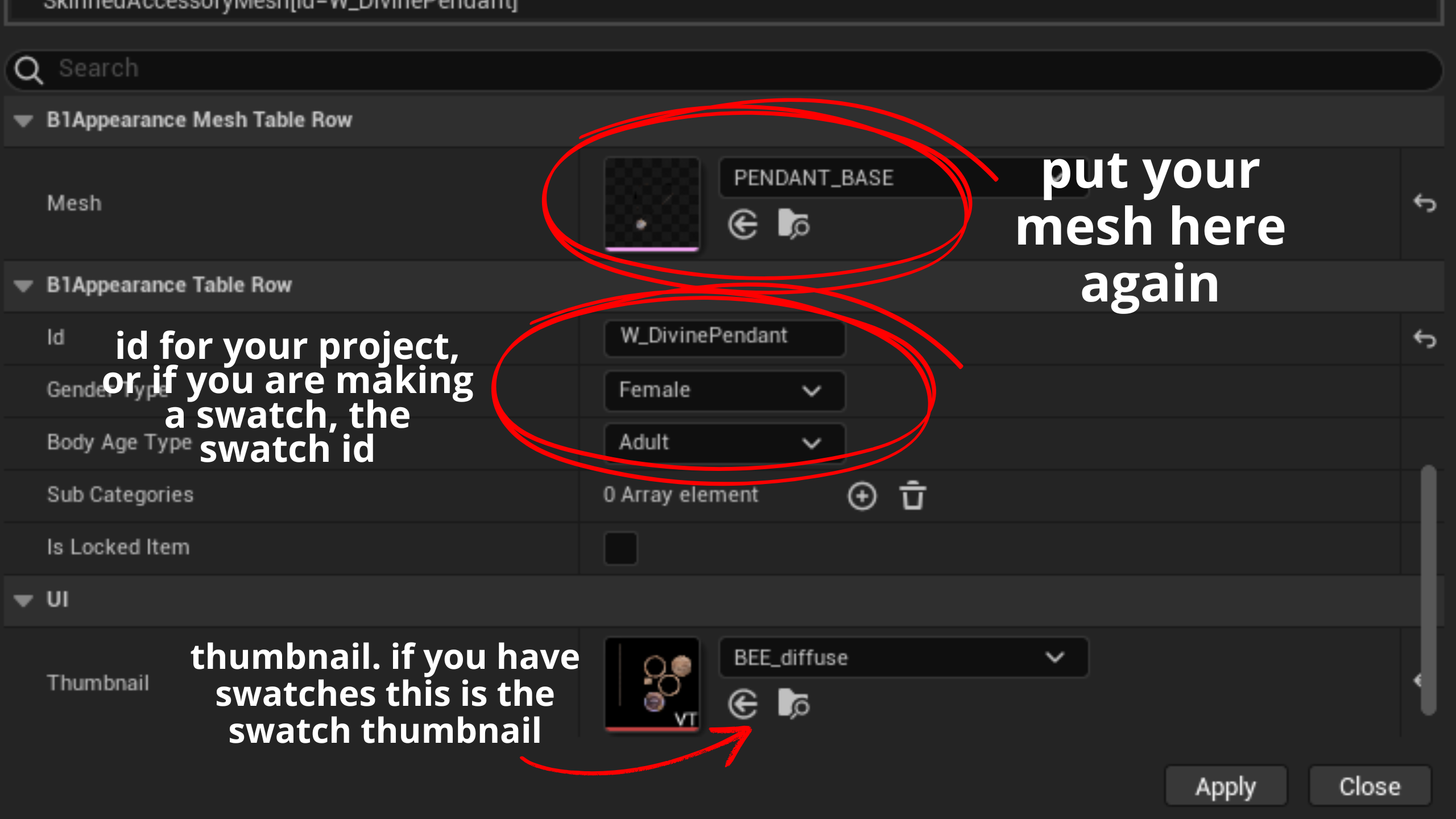
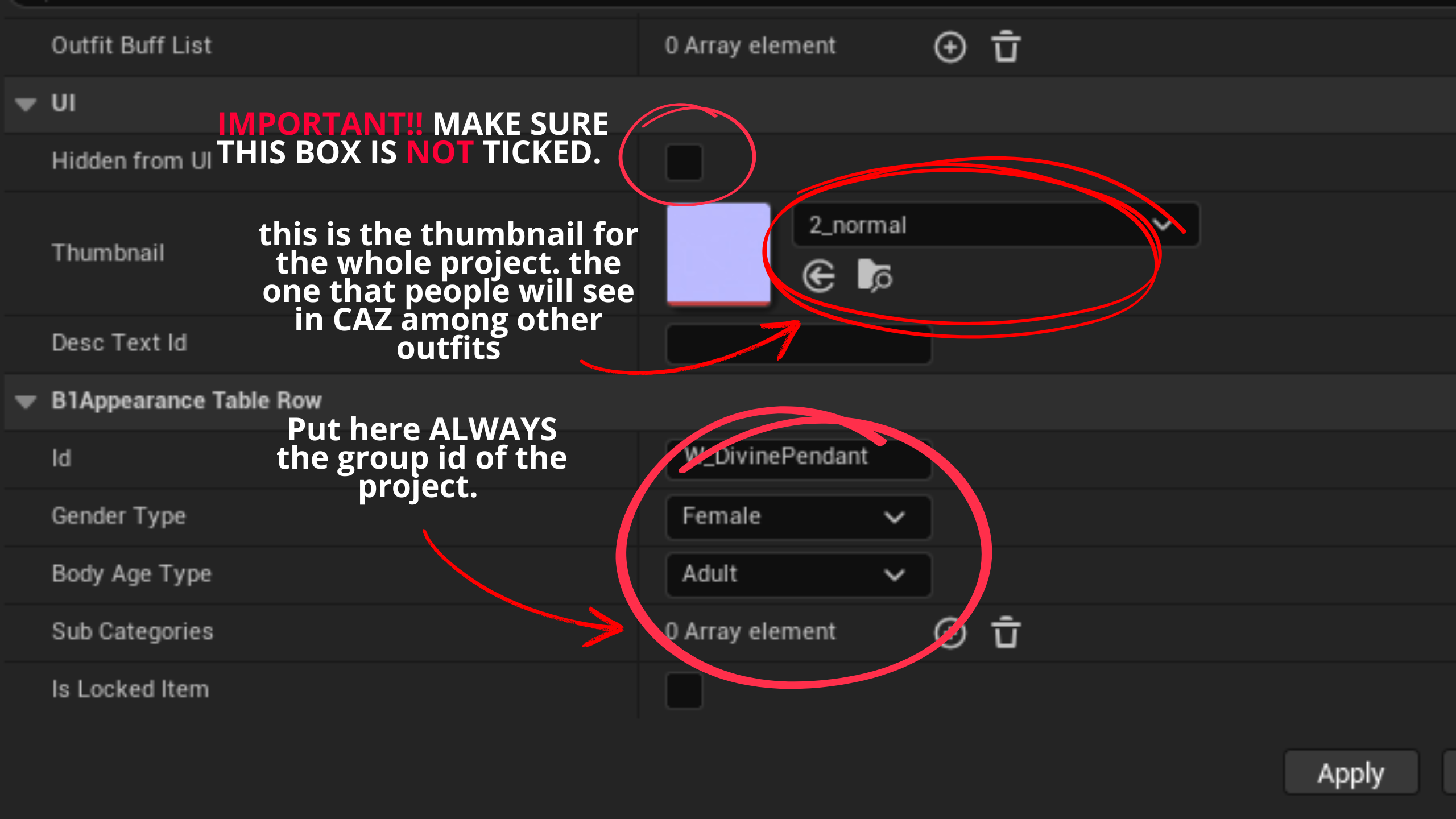
Once you have chosen, right click and select “append new item”. The menu bellow will appear. Follow the steps in the images to set everything as it should be:

IMPORTANT!! There is “Hidden from UI” box that usually comes ticked for necklaces, since some of them are only unlockable in-game by crafting them. Please UNTICK this if you find it ticked, or leave it unticked if not. When it is ticked, your necklace will be in-game, but it won’t appear in CAZ, so zois won’t be able to put it on.
3. EXPORT

Click on your project in the left menu, choose “Create local mod package”. When the modkit tellS you that it was succesfully exported, check in game to see how it looks!

Hope you find this small tutorial useful.

Happy zoiventures! :custom_heart:

6 Likes

Yep, I’ll never be a modder

5 Likes

Nooo don’t say that! I promise it seems more complicated than it is, specially in writting

I will start uploading videos soon!

4 Likes

Stsrt with a beginners, “what is a computer” video first please

4 Likes

Hahahahaha, I will try my best to make it as simple as possible and look forward to the day you start your modding!

4 Likes

We really need a video lol

4 Likes

on the works :psycat_standing: :psycat_standing: :psycat_standing:

2 Likes

Well, that would seem super interesting to me…

2 Likes

I’m in! Hahaha I also think I’ll never be one​:joy::joy::joy:

3 Likes

Don’t be intimidated haha seriously, if you take it step by step it’s not that bad!

I trust in you :psycat_standing: :psycat_standing: :custom_heart:

3 Likes

:blush::sparkling_heart::sparkling_heart::sparkling_heart: everything will be to try… but I’ll give it a shot

3 Likes

Bien!!! Looking forward to seeing your mods around one day :custom_heart:

3 Likes

Hey ( i apologize for my english in advance) im new to modding so im struggling a little with a few things, i wanted to import some watches to the game since theres very little option. i did it with the “inzoider” plug in on blender. But it adds no metallic textures to the watches, so i tried following the tutorial on YT that inzoi posted about the head accessory. the options from attached and skinned accessories are different. so im stuck i dont know what to do, no matter how i import the watch when i select the mesh i dont see the watch there, can you make a tutorial about bracelets or something that could be replaced by a watch? Thanks :slight_smile:

3 Likes

Hi there!

I will try to make a tutorial soon. In the meantime, try this: when you go into the data editor, choose “skinned accesory” and “skinned accesory mesh”, then inside each one choose one of these as your starting point:

Skinned accesory:

gfhgh

Skinned accesory mesh:

Hope it helps!

2 Likes

Hello!

I tried that but i dont seem to get a option to select my “mesh”, i only have body parts options that are already in the game, maybe the problem is the way im exporting the watch from blender as a “static mesh”? like i said im new to modding i know basically nothing. But i really appreciate you taking your time to answering and trying to help. An tutorial video would be amazing!.

Thanks again !

3 Likes

Hi there! That is definitely the problem. For the skinnedaccesory category, the mesh needs to be a skeletal mesh. This means you need to put it through the blender inzoi plugin and add weight to it, then export it and import in inside the modkit, or the data editor won’t read it.

Even though the plugin only has the option for full outfits, if you click “import outfit” and import your watch’s mesh, it will work all the same.

I hope this helps!

regars :psycat_standing: :custom_heart:

2 Likes

(post deleted by author)

Hi.

Thanks for the reply, i exported it using the “inzoider” plug in from blender and then imported that to modkit as skeletal outfit, but it seems like its still reading as a static mesh. I will probably watch a tutorial into how to “add weight” as you said.

Thank you again for the time, and ill be waiting for your future tutorials :slight_smile:

3 Likes

I think the inzoider plugin is outdated as of now, or at least not the best way to export meshes for the modkit. There is an official blender plugin that you can use; if you use that one it will definitely work!

If you have the modkit installed, you can find the official plugin in this directory or similar: C:Program FIles/Epic Games/inZOIMODkit/inZOIMODkit/Extras

Hope it helps!

2 Likes

Ohw, thank you so much i didnt know that was even a thing, i guess i didnt check all the inzoi tutorial videos because i completely missed that, i will give it a shot a try to make it work the best i can, if i for some reason run into a wall again ill post an update.

And again, thanks for all the time you spared helping me, i really appreciate it! :slight_smile:

2 Likes