Hardware Specifications & Operating System Apple M2 Pro, 16 GB, Macintosh HD, Sequoia 15.6.1
Steps to Reproduce: Open application, start new game, play game as normal, save game, return to lobby, return to start page, quit application , quit steam, reopen steam, reopen application, on start page there is not option to load previously played game, only to start a new game
Please provide the entire save file(s) from the date when the issue occurred
Cannot find save file on application lobby/start page, but all save files are visible on Mac folders for this application. Cannot upload .usvx save files to this post since that selection was greyed out for this file type but sharing the link from the upload: Webfolder /b56d313a by file.kiwi Instruction: How to Send User Files to The inZOI Team (Updated)
Details:
Attaching screenshot of start page with time stamp
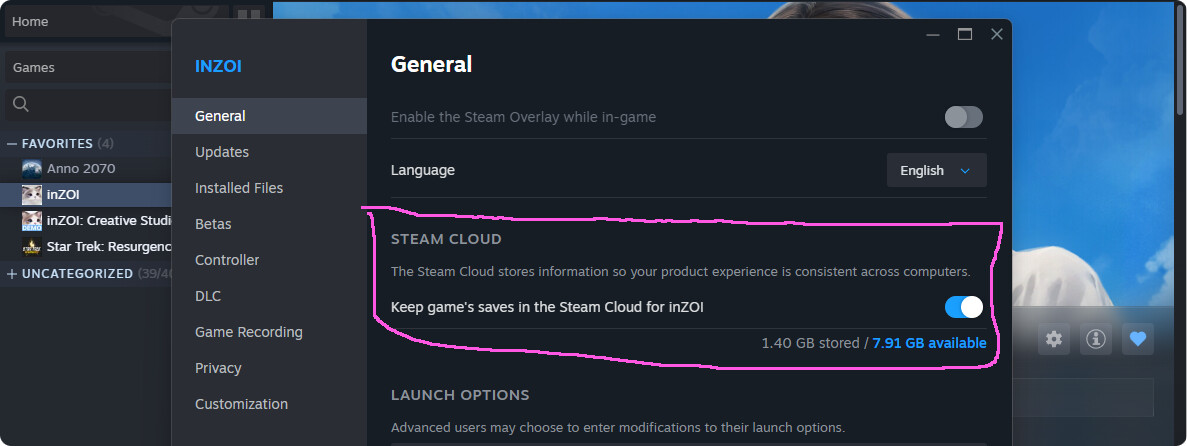
What you could try is to change from saving into the cloud to local in steam (if it’s enabled)
And I don’t know about file paths on mac, but if it’s like in windows, maybe your game folder for the saves is not under ‘Documents’ or where the game ‘expects’ it(?)
Also if you haven’t already: maybe try not to ‘save and exit’ or ‘save’ but to ‘save as’ (?)
Hi @nissacashapp and @ceylan.a.2001,
Sorry for the inconvenience. To help us look into this issue in more detail, could you please share your save files with us? You can find the instructions in the guide below:
Hi @ceylan.a.2001, thanks for your reply and for sharing the file.
To review it properly, we’ll need you to zip and send the entire folder that contains the save file.
Sorry for the trouble — could you please check and send it again?
the files are saved on the, what I believe to be the right place ? Still when I want to keep playing the continue option is not showed in the main menu, I have tried to make a new game, save it, go to the main menu and than the continue option is shown, but no game can be loaded …
Would be nice to have this solve promptly, since is not fun always start from 0
We are sorry for the inconvenience. Could you compress the whole folder that contains the savefile (.zip) and send it to us? Instructions can be found here: How to Send User Files to The inZOI Team (Updated)
Hello @panels.excuse79 again,
Could you please try launching the game again after disabling Steam Cloud? Once you’ve tested it, kindly let us know whether the issue persists so we can assist you further. Thank you.
After investigating this issue internally, we have identified it as being caused by Mac permission access settings. Please follow the steps below to resolve the issue.
Go to System Settings > Privacy & Security > Files and Folders and check if inZOI has been properly added.
If inZOI is not listed, uninstall inZOI via Steam and restart your Mac.
After restarting your Mac, reinstall inZOI via Steam.
If the issue persists after following the steps above, please let us know.
Thanks for confirming! Glad to hear everything’s running smoothly now.
I will be closing this thread for now but if any similar issue reoccurs, please leave a report in a new thread.
 Instruction: How to Send User Files to The inZOI Team (Updated)