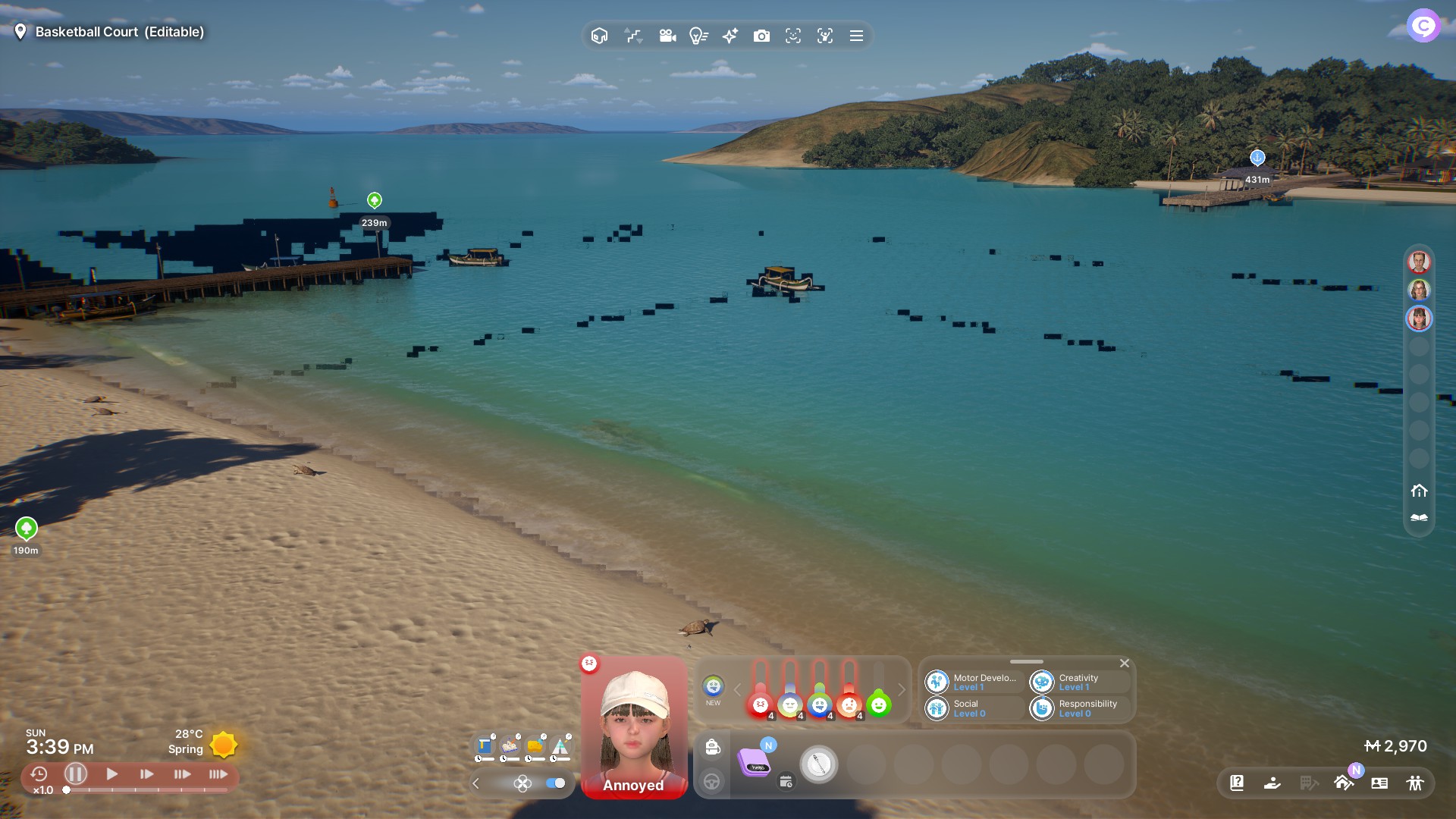
Global Illumination beyond Medium causing Graphical Glitches

  • Game Version:20250820.6849.W

  • Platform:Windows PC Steam

  • Mods: removed (game reinstalled and new inZOI Folder in Documents)

  • Hardware Specifications & Operating System (OS version, CPU, GPU, RAM, storage…): Windows 11 24h2 (OS Build 26100.4946), AMD Ryzen 7 5800X, AMD Radeon RX 7800XT, 32GB RAM, 2x 1tb m2, 1x 4tb hdd

  • Issue Date: Today 21st August 2025

  • Error Message (optional):

  • Details (Providing reproduction steps helps us):

Set Global Illumination level to high or ultra and go to the beach in Cahaya or Bliss Bay.

Picture added to how it looks like

EDIT: It stops happening when i turn on Raytracing but returns when i turn off Raytracing.

2 Likes

Hi @xMarvin732, We’re aware and looking into this issue. We’ll provide any updates we get in this thread. Thanks!

2 Likes

Same issue here

  • Game Version:20250902.7159.W

  • Platform:Windows PC Steam

  • Mods: No mods

  • Hardware Specifications & Operating System (OS version, CPU, GPU, RAM, storage…): Windows 11 24h2 (OS Build 26100.4946), AMD Ryzen 7 5800X, AMD Radeon RX 6800XT, 32GB RAM, 1x 1tb m2, 2x 4tb hdd

  • Issue Date: 05 September 2025 (did not play in August)

  • Error Message (optional):

  • Details (Providing reproduction steps helps us):

Hello i’m coming from another thread that have similiar issue like OP, and have almost identical pc specs the only difference are the storage and Ryzen 5 7600 processor, i have also attached a video regarding this issue.
Youtube “Inzoi AMD Graphic Bug”
I would greatly appriciate if they can merge my thread into this one
Graphic Artefacts on AMD GPU (Black Dots)

As of today, AMD Driver 25.11.1 (Latest) [v.0.4.5 Hotfix]
I tried to reinstall and run Inzoi again the problem seems to be fixed on my end but i’m not sure if this fix comes from the Inzoi itself or the AMD 25.11.1 driver
1 Like