I’m thinking of these ones :
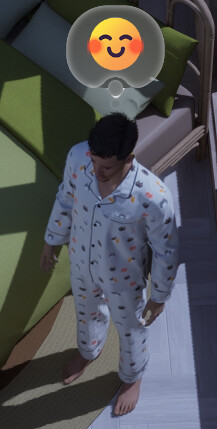
Just give us an option on the menu to hide those please.
Thank you !
I really wish we could hide all these effects and stuff with a cheat. Not just the cat’s eye. Some of them vanish in photo mode but many of them not.
I want the cat’s eye back as a choice over the arrow as well myself.
That’s why I always ask for the options.
It’s nice being able to interact with you again as well.
For some reason on Discord I can’t 
A toggle for these things is never a bad idea. Just give the option so that people can choose if they like it or not!
What annoys me is it constantly popping up covering the skill level i am trying to have my zois learn
This. Having to wait for the thought bubble to disappear so you can see level progress is frustrating!
I couldn’t agree more!
There needs to be a simple way to disable ALL interface overlays. Possibly several commands, as there are the tool palettes as well as the group bubbles, and any other stupid floating bubble things. We have ctrl-shift-u which goes a long way to removing most of the overlays, but sadly NOT all. So we have a half-fix-workaround instead of a solution.
Please, please, PLEASE, provide a simple way to toggle all this distracting overlay clutter ON/OFF!