And can I delete them?

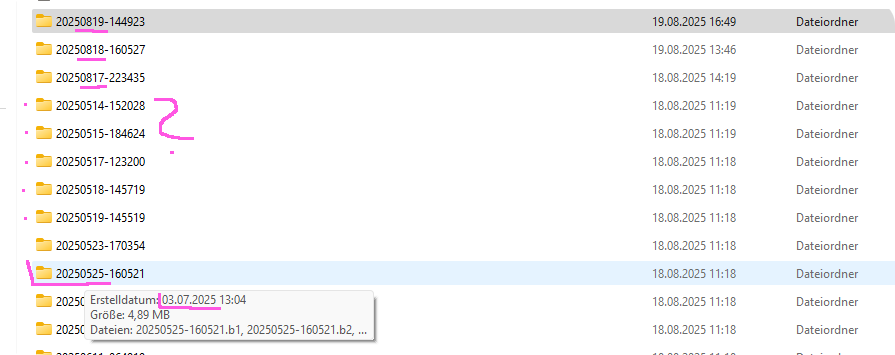
I’m currently doing my backup and in my saves folder are 46 folders from the same day between 11:14 and 11:19 (=5 minutes)
I only ever save manually at the end of the session ö.ö why are there so many? (I have autosave turned off and I’m aware the game saves when changing clothes in CAZ, but I haven’t been in CAZ that often ö.Ö’)
Why are there so many save files in such a short time?
If something happens with my game, will it do to just move the latest of these folders back or do I have to keep all of them?
Or, wait, is the game overwriting/changing them? The name of the folder contains the date I saved it, right?
That’s weird.

The more I look the more confused I get.
I play a few times a week, so the first three saves look correct when we assume that their name is equal to the day I saved them, so ‘250819-…’ is today?
This is correct for the last three days and then, even though I sort the files from latest to oldest, the following are folders are with dates from May.
But when mouseover, the date of creating it, is in July? argh 
In Sims 4 I checked my blog to find the dates of saves to recover houses I deleted in newer saves.
How am I supposed to find the folders I need and what is the correct date?
(I never ‘save’ I always ‘save as’, therefore I have so many saves ^^’)
Similarly, if you put it in the technical support category, they can help you better. In my case, not as many files appear and I have it saved every half hour. Although before leaving I always save manually and when I connect on the screen that appears at the beginning I go deleting the old ones, maybe that’s it.