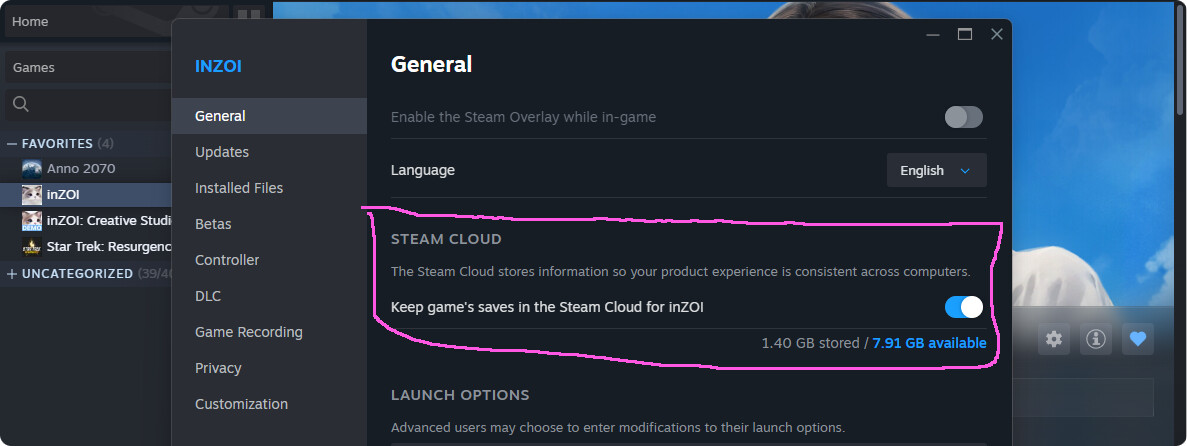
Just a few days ago I found out why the save files act so weirdly, it’s because the default setting on steam saves them into the steam cloud.
I’m a bit paranoid with my save files and I want to save and backup them properly locally because I already noticed this cloud system causes problems and when I googled about it, I found posts of players having issues with the cloud.
So I want to turn it off and save locally.
Has anyone tried this before sucessfully (preferably with inZOI)?
Ok, after backing up my Zoi’s presets and all my houses, I did it
And it went well! I’ve been so afraid omg.
I loaded the game from the cloud and it got saved locally.
That was bugging me for months and before I found out about the cloud, I was wondering why these inZOI saves were so tiny ö.ö
Game also set some of the cloud folders to the same date, so it was impossible for me to delete some of them (the game wouldn’t load -.-)
The control freak in me prefers local saving (and after the reports from other players on steam who had issues - now even more).
If something goes wrong and I’d have to restore the game, I can just put one local save file in an empty save folder and the game starts. Once a month I also backup the whole inZOI Folder under Documents on an extern hard disk, a separated folder on desktop and (in the future) the presets, houses and a save file for each world on an USB stick too (which I’ll keep in my backpack just in case the zombie apocalypse happens ) ^^’
But local saves are still so small compared to my Sims 4 saves:
6 MB (inZOI/no mods) vs 390 MB (Sims 4/no mods)
even though the graphics are so much better, weird
The Inzoi save file itself seems to not take up much space, since it seems to be text data when I tried to inspect it.
In the sims save file I know one reason for the large size are the photos that it stores there (in the sims 3 advice was to disable the scrapbook because it would bloat save files).
This website has some technical info.
It seems Inzoi only stores a few pictures at a time in its save file, you can check them in the portrait folder.
Wisely, Inzoi also stores photos taken by user in a separate folder (Photos).
What issues have you read about cloud saves?
Have they already been reported as potential bugs?
Do you mean the inZOI save file for the cloud or a locally saved file with steam cloud disabled?
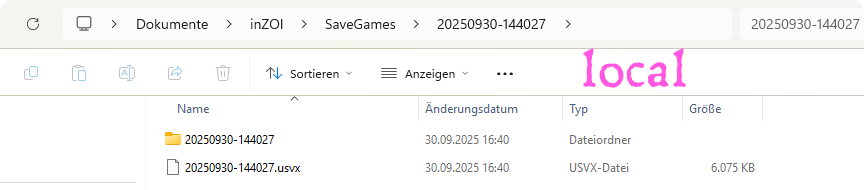
My new local save (cloud disabled) looks like this:
In the folder are 371 portraits of Zois (ö.ö) and an .usvx file
A cloud-enabled save folder on my computer contains the following:
Maybe it’s just data needed to find the actual save file in the cloud(?) therefore it’s so tiny
In the Sims 4, there is an extra folder for the screenshots too, so screenshots are not the cause why the save file size is so huge. My post above shows there is only one file, no folder with files or screenshots and I have no clue what’s in this file.
Before I figured my saves were saved into the steam cloud, I already made a confused post here in the Q&A about that the dates of the files got changed which made it difficult for me to backup and delete files.
My issues started when the game wouldn’t load anymore after I removed back-upped files. Other users reported network related issues, corrupted files, sync problems after updates, antivirus/firewall issues, cloud conflicts, bugs in steam…
Steam seems aware of these issues.
So I decided to not let any of this happen by saving local.
(And if my attempts go all wrong, I can still turn the cloud back on. Hopefully ö.ö’
What I also want to know: In the save file, are my saved houses and Zois (+presets) included?
And all the worlds? Or just the one I was playing in when I saved?
Would that save file alone be enough to restore my game?
So many questions ^^’
I think the save includes the world as it was when you saved not just your current household. I’ll test it out.
I also stopped using the cloud feature a while back because I noticed every time I deleted some files from my inzoi folder (saves, mods etc) it kept restoring them and it was annoying me.
So I tested. I took a save from beginning of September and removed all my other saves. I have families I had added myself in Dowon and Bliss Bay from presets I downloaded from canvas and those families still exist in this save file in their respective world. I even removed the ModSaves folder (not sure when its for) and it didn’t affect them. So I think you should be able to restore from an existing save file as long as if you use clothing mods, those mods still exist in your mods folder.
To add when the save file loaded my zoi was on a boat in Cahaya so I travelled to the other worlds to check their status
Thank you!
Also for testing with the ModSave folder.
I have no time to test it atm, but I’ll keep on putting the ‘creations’ folder on my emergency backup USB stick because I’m still not sure the Zoi presets and Houses I’ve built are included.
The (local) save file is ~6MB and one house alone ~5MB (in the download screen/~250KB as a file in ‘Creations-MySites’ so that still confuses me ^^’)
I’ll start by saying that I’m very, very bad at Windows because I’ve been using Mac for almost 20 years, and I haven’t touched Windows since Vista.
Now I play on my son’s PC because my Mac has an M1 chip that doesn’t meet the requirements.
Since I’m a bit paranoid about saves :), I was wondering if it was possible to save them on both Steam and PC.
Now I have two Inzoi folders on my PC and I don’t know why :).
One is on One Drive > Paola-Personal > Documents and it’s full.
The other is on This PC > Windows-SSD (C) > Users > mialu > Documents and it’s only the mods.
By the way, I don’t know what the mess I’m making, but if I download a new mod, it only ends up in the folder in the second path and I have to manually put it in the other.
I think if you haven’t switched in the steam settings that you want to save locally and not in the cloud, it is still saving into the steam cloud. You can check this in inZOI’s steam settings
One drive cloud is a different cloud (I remember from my Sims days, this cloud wasn’t recommended either, therefore I turned this off as soon as I got my new computer last year).
What you can do is to turn on and off saving into the steam cloud and save locally and to the steam cloud in rotation. Like mentioned above, you can restore your game with a single local save.
But for me it didn’t work with the files from the steam cloud. I mentioned somewhere above that I deleted a few of these saves and the game wouldn’t load from only the latest save(s) (there are issues because the dates of these saves get changed somehow).
Or you could backup (and move them somewhere else) the one drive saves to make some place in that folder? But I think I remember one drive keeps saves from getting saved locally, at least for the Sims 4. Or caused other issues. You’d have to look into that or maybe someone else here knows o.o
Do you not have an inZOI folder under Documents? Like in the pic below?
I have no idea if it is as easy to disable onedrive as it is with the google cloud.
For now, you have two clouds active at once ö.ö
AI says it’s safe to disable:
(I think by disabling, it will stop saving in the cloud and start to save locally.)
Quote:
Yes, it is safe to disable or stop OneDrive from saving files by unlinking your PC from your account, turning off folder backup for Desktop, Documents, and Pictures, and changing your default save locations in Windows settings and Microsoft Office apps to your local hard drive instead of the cloud. Disabling OneDrive does not delete your existing files, which can still be accessed online at onedrive.com
/quote end
But it’s advised to backup your onedrive files locally.
So enter the onedrive cloud and download the inZOI folder to a local folder to be safe.
And I it’s the safest and best you look this up/google it in Italian so nothing goes wrong and you don’t miss anything.
Disabling onedrive will probably affect all your games/saves. Maybe check if you can disable it just for inZOI?
Thanks so much!
I’ll try it in the next few days when I have some time.
On this PC, I only play Inzoi. I usually only get games I can play on my Mac :), but Inzoi was too appealing.
At first, I played on GeForce Now, then I wanted mods and didn’t like how it saved photos, so I switched to this PC.
Steam was very useful because I could switch from GeForce to PC without losing anything.

 ) ^^’
) ^^’